Patta Chitta
The Tamil Nadu e-Services Portal was launched by the Government of Tamil Nadu to make land-related services easier for the public. Think of it as a digital shortcut for checking land ownership records. Earlier, people had to visit the Taluk office multiple times and wait in long queues just to get Patta Chitta details. Now, the same information can be accessed from your mobile or computer within minutes. The portal allows land owners to view and download their Patta Chitta easily, helping bring more transparency to land verification.
Patta Chitta Online Services
| Aspect | Details |
|---|---|
| Portal Name | Patta Chitta (Tamil Nadu Land Records e-Services). |
| Launched by | The Government of Tamil Nadu (Revenue Department). |
| Purpose | Serves as the primary legal proof of land ownership in the state. |
| Key Information | Owner's name, Patta & Survey numbers, Land area, Classification (Wet/Dry), and Tax details. |
| Importance | Mandatory for buying/selling land, applying for bank loans, and legal verification. |
| Official Website | https://eservices.tn.gov.in/ |
Why Patta Chitta is More Than Just a Piece of Paper
If you own land in Tamil Nadu, your Patta Chitta is essentially the "Identity Card" for your property. While the sale deed proves you bought the land, the Patta Chitta is the government’s way of saying, "Yes, we recognize you as the owner."
Here are 10 ways this document actually makes your life easier:
1. It’s Your Final Word on Ownership
When your name is on the Patta Chitta, it’s the ultimate proof that you are the legal owner in the eyes of the Revenue Department. It’s your best defense if anyone ever tries to make a false claim on your plot.
2. It Makes Selling Stress-Free
Buyers are naturally cautious. When you can show a clean, updated Patta Chitta in your name, it builds instant trust. It shows the title is clear, helping you close the deal much faster.
3. The "Golden Key" for Bank Loans
Banks won't take your word for it. Whether you need a home loan or an agricultural credit, the first document a manager will ask for is your digital Patta Chitta. It’s the proof they need to approve your funding.
4. No More Boundary Wars
Arguments with neighbors over a few inches of land are common. Because this document lists exact survey and sub-division numbers, it acts as a "referee" to show exactly where your land ends and the next person’s begins.
5. Essential for Building Your Dream Home
Before you can get building approval, authorities check your land classification (like Nanjai for wet land or Punjai for dry land) in the Patta Chitta. This ensures your construction plans are legally allowed on that specific plot.
6. Simplifies Family Partitions
When it’s time to divide family property or handle inheritance, a clear Patta Chitta prevents "who gets what" arguments. It keeps the records transparent for the next generation.
7. Unlocks Government Benefits
If you’re a farmer, you need this document to access subsidies, crop insurance, or disaster relief. Without it, you are essentially "invisible" to government welfare schemes.
8. No More Queues at the Taluk Office
One of the biggest wins is the e-Services portal. You no longer have to hunt down a VAO or stand in line for hours. You can verify and download your records from your phone in minutes.
9. Keeps Your Records "Clean"
Regularly checking your Patta Chitta helps you spot errors early. Small mistakes in your name or survey number are much easier to fix now than ten years later when you're in the middle of a sale.
10. Ultimate Peace of Mind
At the end of the day, knowing your property is correctly recorded in the government’s database is a huge relief. It’s the long-term security your investment deserves.
Important Tip
Most people stop once the registration is done. Don't do that. Always check the portal about 3 to 4 weeks after you buy land to make sure the "Mutation" (the name change) has actually happened. If the old owner's name is still there, you need to follow up to ensure your ownership is official!
Land Record Services Available on the Patta Chitta Portal
The Patta Chitta portal is Tamil Nadu’s official e-Services platform for land records. It lets you access, verify, and manage your land documents without running to the Taluk office. Here’s what you can do:
1. View & Download Land Records
This is the most popular part of the portal because it gives you the actual documents you need for most legal work.
-
Patta / Chitta / TSLR Extract:
What it is: Shows ownership details, survey numbers, land type, and area size.
The Difference: Urban properties get a TSLR extract, while village lands get a Patta Chitta.
When to use: Use this when selling property, applying for a bank loan, or verifying your name is on the record. -
A-Register Extract:
What it is: A deep dive into the land’s "biography." It includes the land classification (like Nanjai for wetland or Punjai for dry land), tax records, and ownership history.
When to use: Perfect for buyers who want to check the "background" of a property before paying. -
FMB Sketch (Field Measurement Book):
What it is: A map showing exact boundaries, survey numbers, and precise measurements.
When to use: Essential if there is a boundary dispute with a neighbor or if you are planning to build a house.
2. Verification Services
These tools help you stay safe from fraud and legal trouble.
- Verify Patta / Chitta: If someone shows you a paper document, you can enter the reference number here to see if it matches the official government digital record.
- Verify Poramboke Land: This allows you to check if a piece of land is private or government-owned (Poramboke), such as a road, lake bed, or canal. Always check this before buying land.
3. Application & Status Tracking
You no longer have to wait in line at the Tahsildar’s office to file paperwork.
- Apply for Patta Transfer: If you’ve just bought or inherited land, you can start the process of moving the Patta into your name right here.
- Check Application Status: Track your transfer or subdivision request using your Application ID.
- View Patta Order Copy: Once your transfer is approved, you can download the official order from the Tahsildar right from your couch.
Difference between Patta and Chitta
| Feature | Patta | Chitta |
|---|---|---|
| Primary Purpose | Acts as a Title Deed. It is the main legal document proving who owns the land. | Acts as a Land Classification record. It describes the nature of the land. |
| Key Information | Focuses on the Owner's Name, Patta Number, and Survey Number. | Focuses on Land Type (Nanjai or Punjai) and the area of the land. |
| Issued By | The Tahsildar of the specific Taluk. | Originally maintained by the Village Administrative Officer (VAO). |
| Land Categories | Proves ownership for a specific individual or group. | Classifies land as Wet (Nanjai) or Dry (Punjai). |
| Current Status | Still the primary document for property transactions. | Since 2015, it has been merged with Patta into a single digital record. |
| Legal Use | Essential for selling property or proving ownership in court. | Primarily used to understand the land's usage and agricultural status. |
How to Apply for Patta Transfer Online
Applying for a Patta transfer is the final step in making a property truly yours. In Tamil Nadu, this is done through the Tamil Nilam portal (accessible via the e-Services website).
Here is a clear, step-by-step guide to the online application process.
Step 1: Gather Your Documents
Before logging in, scan these documents (keep files under 3MB, preferably in PDF format):
- Sale Deed: The registered document proving you bought the land.
- Encumbrance Certificate (EC): To show the property has no legal dues.
- Identity Proof: Aadhaar Card, Voter ID, or PAN Card.
- Address Proof: Recent EB bill or Property Tax receipt.
- Previous Patta Copy: If you have the seller's old Patta.
- For Inheritance cases: You will also need a Legal Heir Certificate and Death Certificate of the previous owner.
Step 2: Register on the Portal
- Go to the official TN e-Services Portal.
- Click on "Apply Online Patta Transfer".
- You will be redirected to the Tamil Nilam site.
- If you are a new user, click "Are you new to Tamil Nilam?" and sign up with your name, mobile number, and email.
- Log in using your mobile number and the OTP sent to you.
Step 3: Fill Out the Application
Once logged in, you will fill out a form that usually has six parts:
- Applicant Details: Your name, address, and contact info.
- Location Details: Select the District, Taluk, and Village where the land is located.
- Transfer Type: Choose whether this is a "Not Involving Subdivision" (transferring the whole plot) or "Involving Subdivision" (splitting a piece of land from a larger plot).
- Land Details: Enter the Survey Number and Sub-division Number.
- Upload Documents: Attach the scanned copies of your Sale Deed and other proofs.
- Payment: Pay the nominal application fee online.
Step 4: Fees & Processing
- The Fee: Typically ranges from ₹100 to ₹600 depending on the land type (Rural vs. Urban) and whether a subdivision (surveyor visit) is required.
- The Timeline: It usually takes 15 to 30 days.
- Verification: A Village Administrative Officer (VAO) or Revenue Inspector (RI) may visit the site to verify the boundaries and ownership.
Step 5: Track & Download
After submitting, you’ll get an Application ID. You can use the "Application Status" button on the home page to see how it's progressing. Once approved, you can download your fresh Patta Order Copy directly from the portal.
Patta Chitta: Common Issues & Solutions
| Query / Issue | Root Cause | Practical Solution |
|---|---|---|
| "No Record Found" message | The land record might not be digitized, or you selected the wrong land type (Rural vs. Urban/Natham). | 1. Double-check the Survey/Subdivision Number. 2. Try switching the Land Type (some village outskirts are now "Natham"). 3. If still not found, visit the Taluk/VAO office for manual records. |
| Old owner's name still appears | The Patta transfer process was never initiated or is still pending in the revenue system. | Apply for a Patta Transfer online using your registered Sale Deed and Encumbrance Certificate (EC). |
| Incorrect spelling of name | Manual data entry error during the digitization of old paper records. | File a Patta Correction request at the Taluk Office. Minor typos can sometimes be fixed via a written request to the Tahsildar with ID proof. |
| Survey Number not in dropdown | The survey number might have changed during a recent Resurvey or subdivision. | Check your Sale Deed for the "New Survey Number." You can also use tools like Landeed or TNGIS to find the updated number. |
| Area (size) is wrong in Patta | Discrepancy between the Sale Deed and the A-Register/FMB map. | Apply for a Field Survey. A government surveyor will measure the land and update the FMB Sketch and Patta if a genuine error is found. |
| OTP not received on mobile | DND (Do Not Disturb) might be active, or there is a portal server delay. | 1. Use a different mobile number. 2. Wait for non-peak hours (early morning or late night). |
Download Patta Chitta Online – Tamil Nadu
Getting your Patta Chitta online is a straightforward process, but the portal asks you to choose between Rural and Natham land. Knowing the difference ensures you get the right document.
- Rural: Standard agricultural or open land in villages.
- Natham: Residential land in a village (where houses are built).
Here is the updated 2026 step-by-step guide to downloading your records.
Step-by-Step Guide
1. Visit the Official Portal
Go to the Tamil Nadu e-Services Portal. The site is available in both English and Tamil.
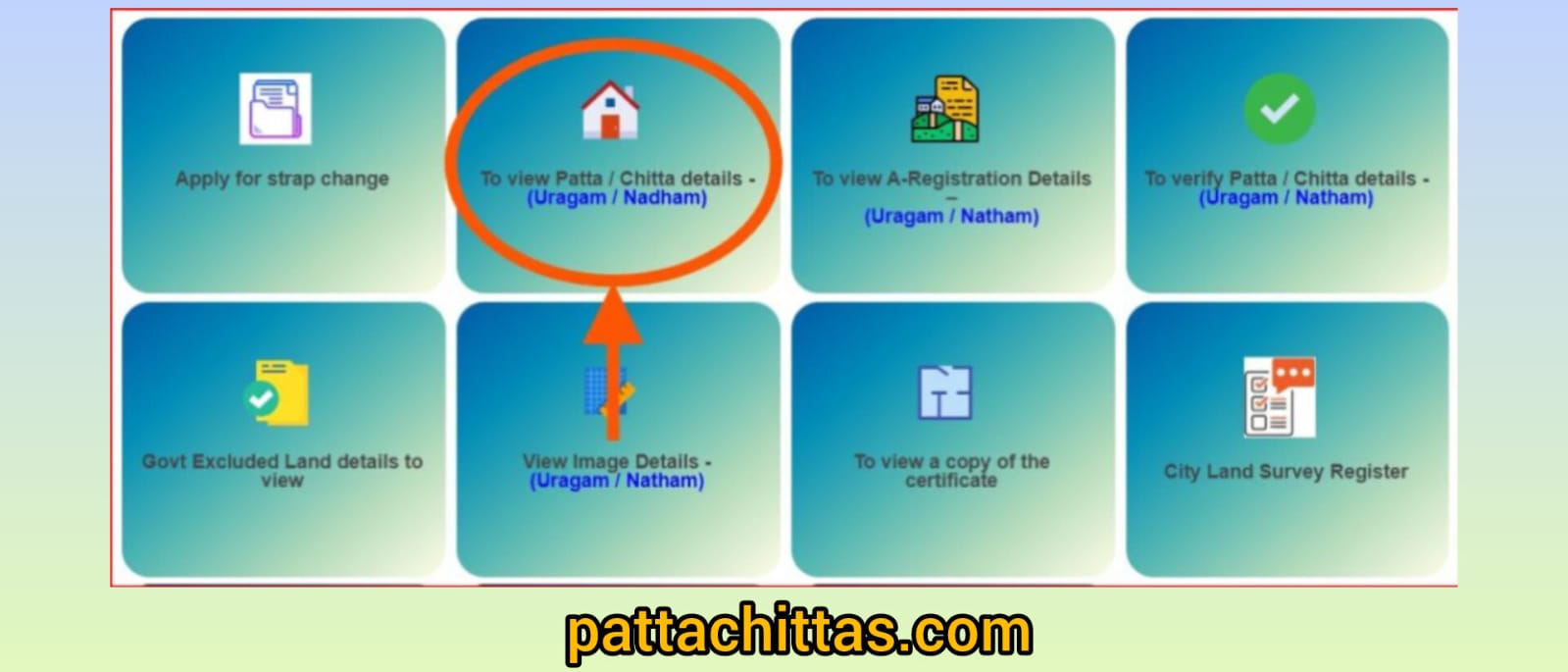
2. Select the Service
On the homepage, click on "View Patta & FMB / Chitta / TSLR Extract".
3. Choose Your Location
Select the following from the dropdown menus:
- District
- Taluk
- Village
4. Select Land Type (The "Rural vs. Natham" Step)
This is where many people get stuck.
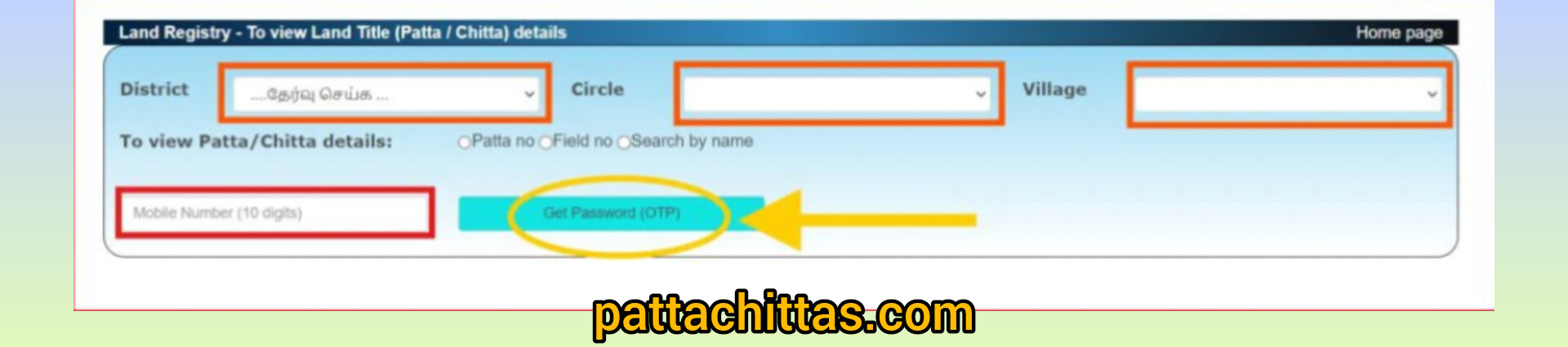
- Select Rural if your land is agricultural or outside the main village residential area.
- Select Natham if your property is a house or a residential plot within the village "Abadi" area.
- Note: If you aren't sure, try Rural first; if "No Record Found" appears, try Natham.
5. Enter Search Details
You can search using one of two "keys":
- Patta Number: If you already know your unique Patta ID.
- Survey Number: Enter the Survey Number and the Subdivision Number. (This is the most reliable way).
6. Authentication (OTP)
- Enter your Mobile Number.
- Click "Get OTP".
- Enter the 6-digit code sent to your phone.
- Enter the Captcha (Authentication Value) shown on the screen.
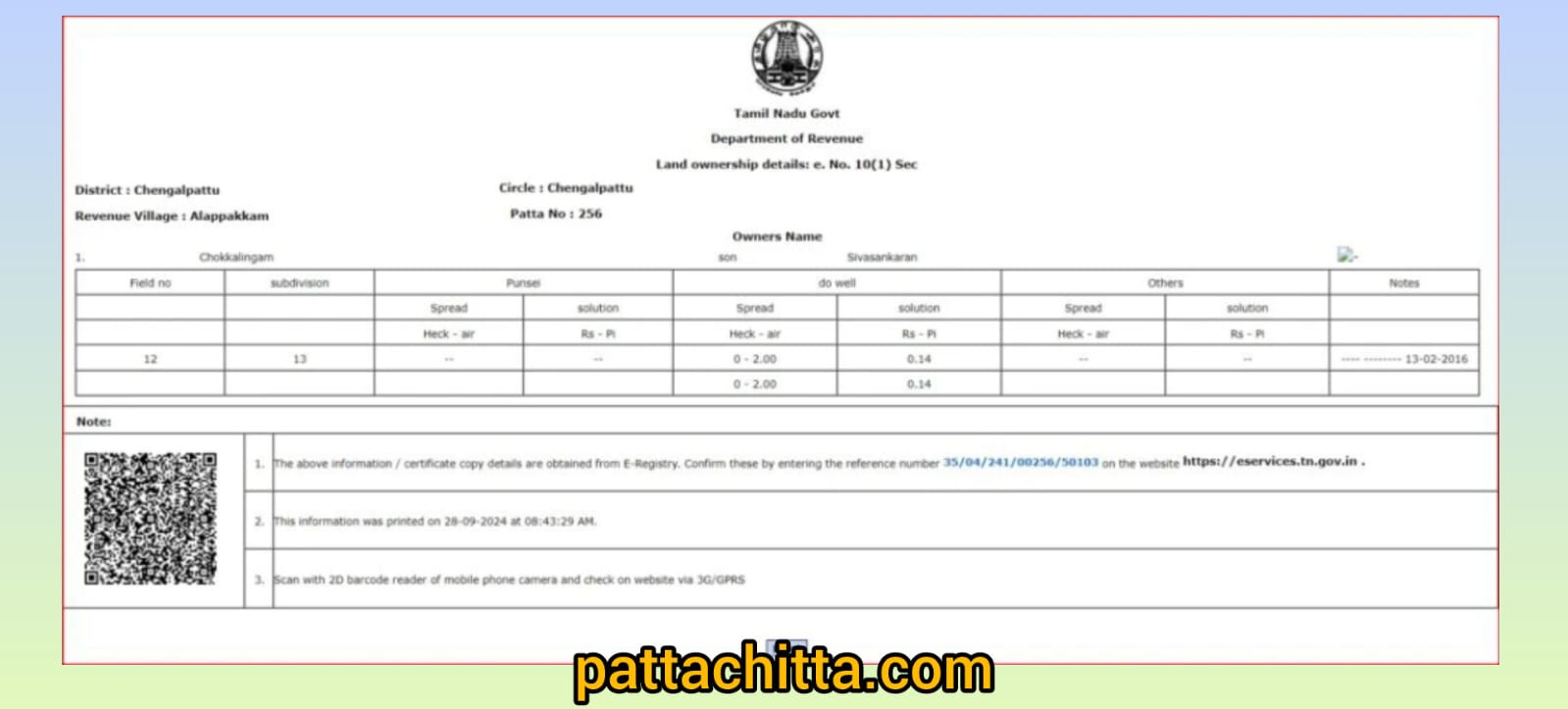
7. View and Download
Once you hit Submit, your Patta Chitta will appear on the screen.
- To Save: Click the "Print" button at the bottom.
- Tip: Instead of actually printing, change the printer destination to "Save as PDF" to keep a digital copy on your phone or computer.
Verify Patta / Chitta
Website: Go to eservices.tn.gov.in.
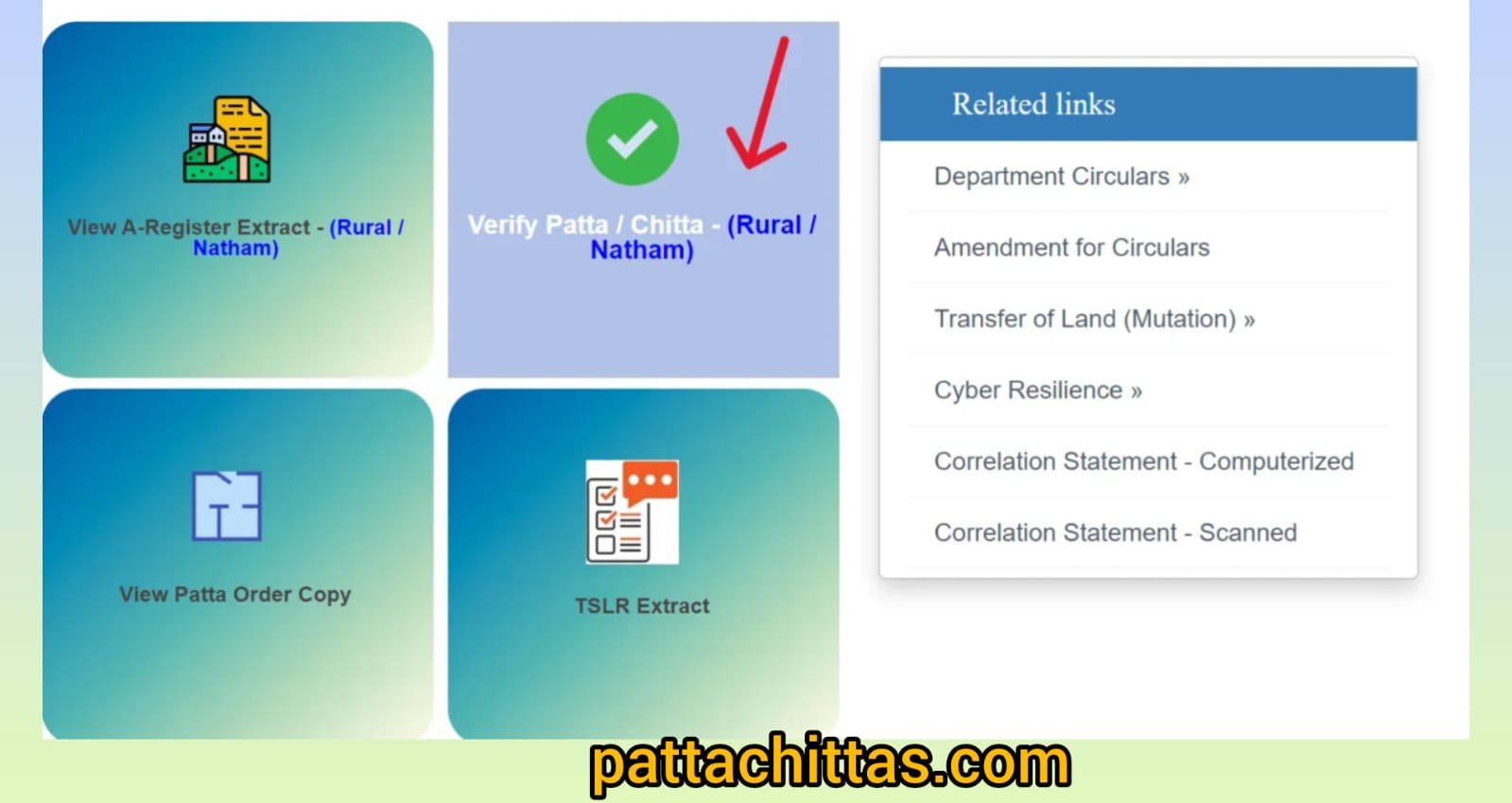
Button: Click "Verify Patta / Chitta" (usually at the bottom of the home page).
Input:
- Enter the Reference Number (the long code on your document).
- Enter your Mobile Number and hit "Get OTP".
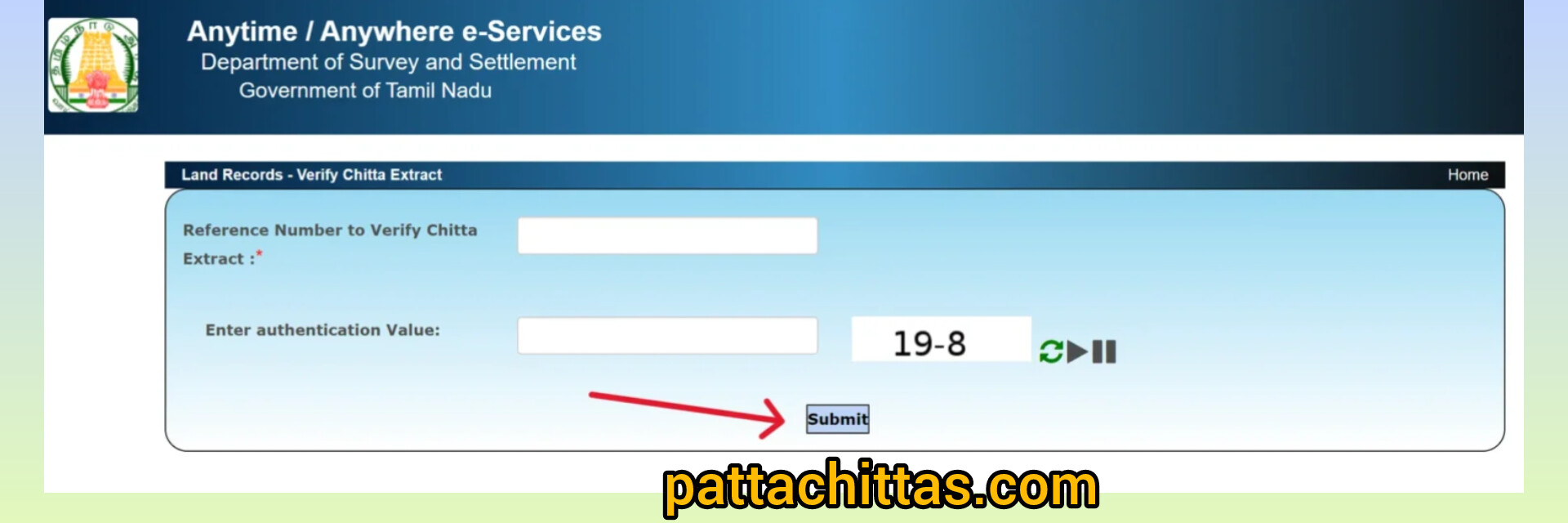
Finish: Enter the OTP and click Submit.
View Your TSLR Extract Online
To get your TSLR Extract quickly and simply, follow these five steps:
- Go to the Website: Visit the Tamil Nadu e-Services portal.
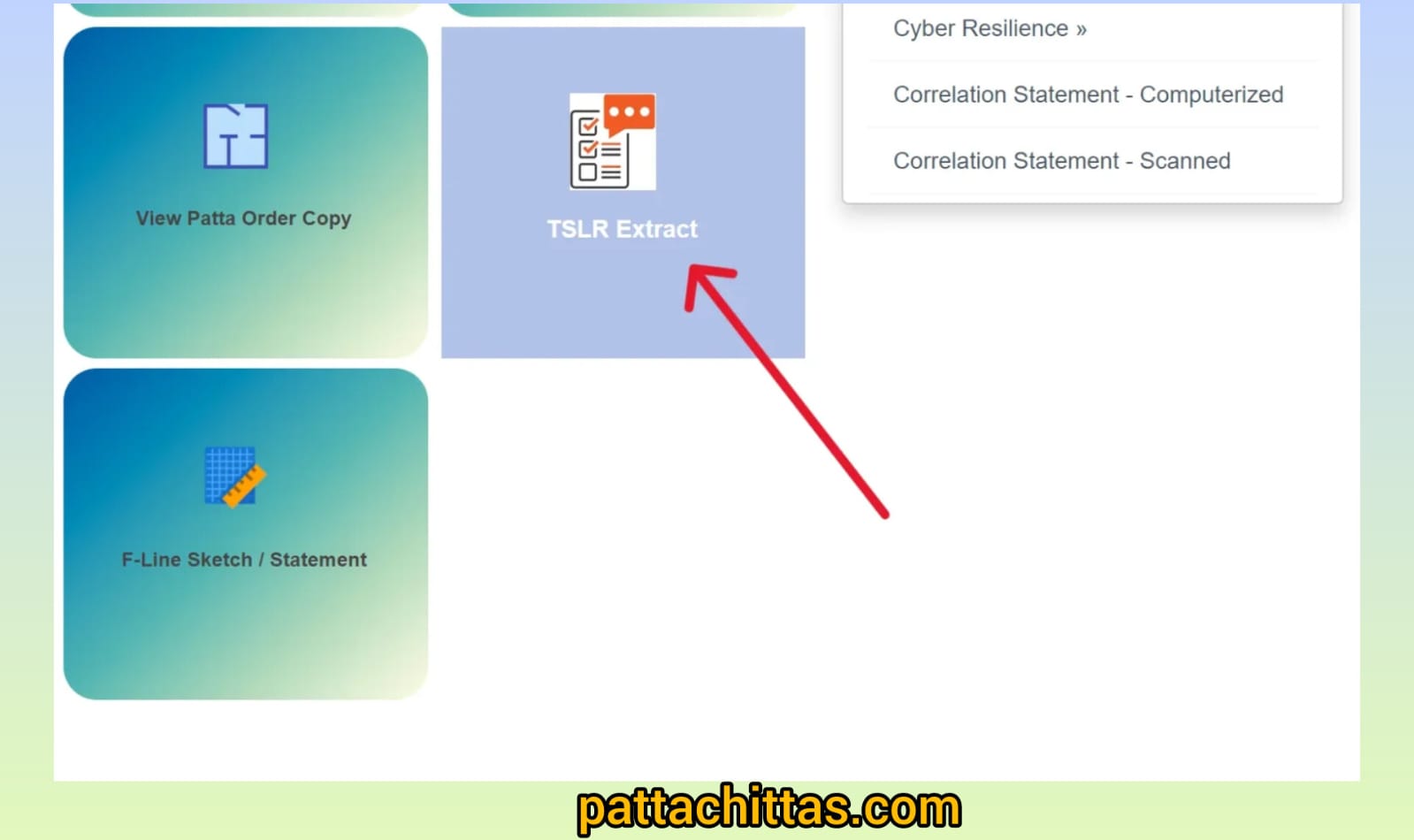
- Pick the Right Link: Click on "View Patta & FMB / Chitta / TSLR Extract."
- Fill in Your Location: Select your District and Taluk, then choose "Urban" as the area type.
- Enter Property Details: Select your Town, Ward, and Block. Then, type in your Survey Number and Sub-division Number.
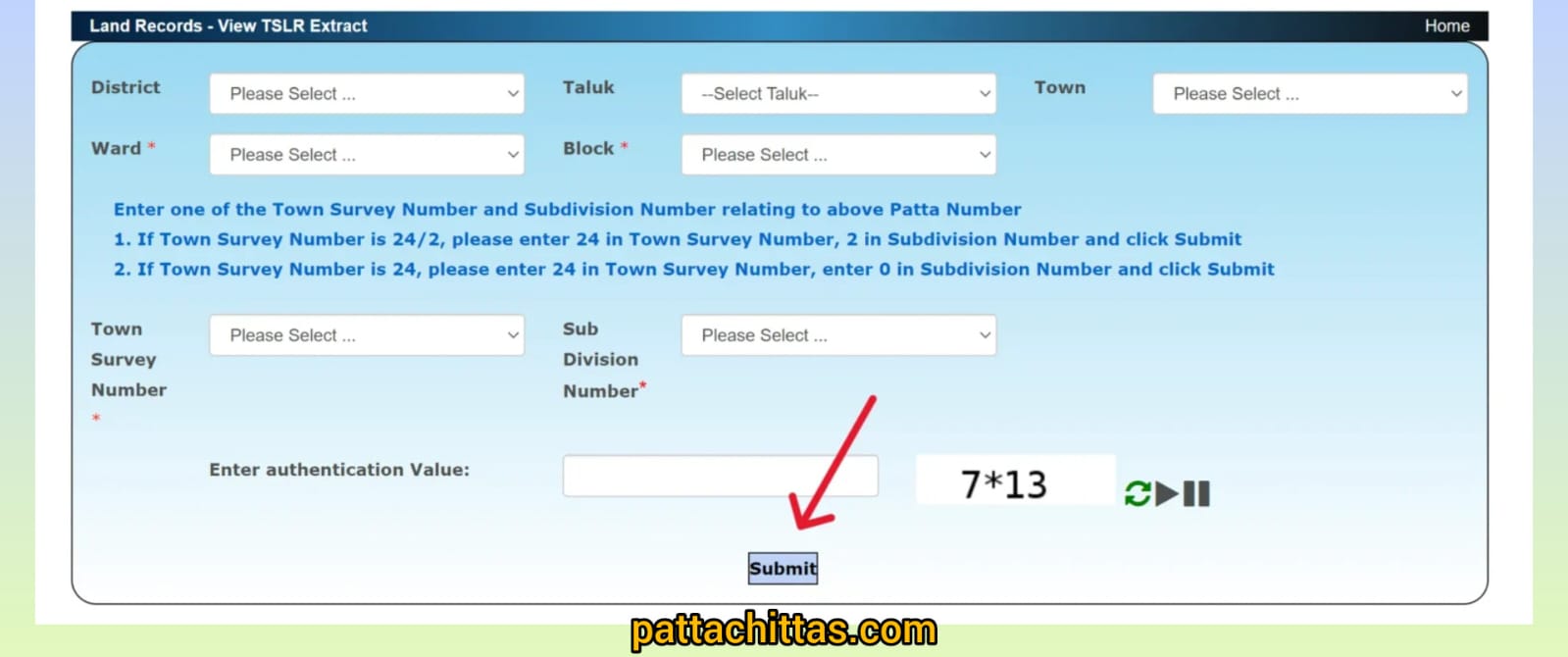
- Authenticate & View: Type the captcha code (and your phone number if asked for an OTP), then click Submit to see your document.
View FMB Sketch Online
Steps to View FMB Online
- Visit the Portal: Go to the Tamil Nadu e-Services website.
- Select the FMB Option: On the home page, click on "View Patta & FMB / Chitta / TSLR Extract."
- Enter Location Details:
- Choose your District and Taluk.
- For Area Type, select Rural (since FMB is the standard for rural/natham lands).
- Select your Village.
- Enter Property Details:
- Type in your Survey Number.
- Select the Sub-division Number from the dropdown list.
- Authenticate and Submit:
- Enter the Captcha characters shown.
- If prompted, enter your Mobile Number to receive and verify an OTP.
- View the Map: Click Submit. A PDF of the FMB sketch will be generated, showing the boundaries, dimensions, and neighboring survey numbers of your plot.
Department / Office Contact Information
| Department / Office | Contact Information |
|---|---|
| Directorate of Survey & Settlement |
Address: No.1, Survey House, Kamarajar Salai, Chepauk, Chennai-600005 Email: dir-sur@nic.in |
| State Helpline | Phone: 1100 |
| Commissionerate of Land Administration (CLA) |
Phone: 044-28544800 Email: cla.tn@nic.in |
| Registration Dept. Helpdesk | Phone: 1800 102 5174 |
| District Survey Office | Varies by District (e.g., adsur[district]@nic.in) |
FAQs
1. Are Patta and Chitta still separate documents?
No. Since 2015, the Tamil Nadu government has merged them into a single digital record. When you search for your land details online, you receive a combined Patta Chitta Extract. The "Patta" part proves ownership, while the "Chitta" part provides the land classification (e.g., Nanjai/Wetland or Punjai/Dryland).
2. Can I transfer a Patta to my name online after buying property?
Yes. If your property transaction does not involve dividing the land (i.e., you bought the entire plot), the transfer often happens automatically after registration. However, if you bought only a part of a larger land (sub-division), you must apply via the Tamil Nilam portal.
Cost: Usually between ₹100 – ₹300.
Time: Typically takes 15 to 30 days for approval.
3. Why does the portal show "No Record Found" for my property?
This is the most common issue in 2026. It usually happens for three reasons:
- Area Mismatch: You might be searching under "Rural" for an urban property (which requires the TSLR option) or vice versa.
- Manual Records: Some older records or "Natham" (village residential) lands may not have been digitized yet.
- Recent Transfer: If you just bought the land, the system may take a few weeks to update the database.
4. Is a printout from the e-Services portal legally valid?
Yes. The digitally signed Patta Chitta downloaded from the official website is legally valid for most purposes, including bank loans and property sales. You can verify its authenticity using the "Verify Patta" feature on the website by entering the reference number printed on the document.
5. How do I fix a spelling mistake in my name on the Patta?
Minor spelling errors can often be fixed by submitting a request through the online portal with supporting documents (like your Sale Deed and Aadhaar). However, for major name changes or if the portal doesn't allow the edit, you must visit the Tahsildar at the Taluk Office with a physical petition.
6. Is Patta mandatory for selling an apartment/flat?
No. For apartments, the land is usually "undivided" (UDS). While the builder or the association holds a "Joint Patta" for the entire land, individual flat owners typically do not need a separate Patta for their specific unit. Your Registered Sale Deed and Encumbrance Certificate (EC) are the primary documents for flats.